
Key takeaways
- Compare app-controlled automatic laser cat toys for owners scheduling indoor cat play with automatic shutoff timers and timed daily sessions for indoor cats.
What's inside
As an Amazon Associate I earn from qualifying purchases. This post may contain affiliate links at no extra cost to you.
A timed game is a fair game, and a best app-controlled automatic laser cat toys for owners scheduling indoor cat play with automatic shutoff timers setup makes the timer do the work. The owner sets the schedule, the toy starts on time, and the shutoff timer ends the session without anyone picking up the phone. That rhythm matters for indoor cats, because a laser dot can never be caught, and a game that runs too long can leave a cat frustrated rather than fulfilled. Short, regular sessions with a clear end are the kind a cat looks forward to.
The products in this guide all combine scheduling with an automatic end. Some run a patrol of a fixed length, some run a scheduled session that stops at a set time, and some return to a dock when the session is done. The driving robots suit cats that roam, while the fixed cameras suit a strict timetable in one room. Either way, the shutoff timer is the feature that turns a fun gadget into a responsible routine.
Quick verdict
For owners who want the simplest timed robot, the Enabot EBO Air leads this group. Its automatic laser toy runs from the app, its tumbler body rights itself after a bump, and it returns to its dock to recharge on its own, so a scheduled session ends with the robot parked and ready for the next one. For owners who want the sharpest timed patrol, the Enabot EBO Air 2 FamilyBot is the pick, with scheduled 3-minute patrols and a 2K camera.
Owners who want the most polished scheduled play on a fixed camera should look at the ZUMIMALL Pet Camera with Laser Toy, with custom laser paths and scheduled auto-play. The Petcube Play 2 pairs autoplay with scheduled play and finger-drag control. The Youpet Dog Camera is the affordable movable option with a red-dot laser, a treat dispenser, and app-controlled 360-degree movement. The Enabot EBO ROLA PetPal adds scheduled snack feeding so a timed session ends with a reward, and the pumpkii BQ70 Pet Camera Robot is the affordable driving option with auto recharge.
The table below sums up the group at a glance.
| product | key spec | best for |
| Enabot EBO Air Pet Robot | 1080p, automatic laser toy, auto-recharge | Simple timed robot play |
| Enabot EBO Air 2 FamilyBot | 2K camera, LED laser, scheduled patrols | Timed 3-minute patrols |
| ZUMIMALL Pet Camera with Laser Toy | 3MP, custom laser paths, scheduled auto-play | Scheduled play with custom paths |
| Petcube Play 2 Wi-Fi Pet Camera | 1080p, 160-degree view, scheduled play | Polished scheduled play |
| Youpet Dog Camera | 1080p, red-dot laser, 360-degree movement | Affordable movable timed play |
| Enabot EBO ROLA PetPal | 2.5K camera, laser games, scheduled feeding | Timed sessions ending with a snack |
| pumpkii BQ70 Pet Camera Robot | 1080p, laser play, auto recharge | Affordable mobile timers |
How we chose
The details that shape daily use come from the product pages: how the owner sets a schedule, how a session ends, how long a session runs, and how the device behaves when the timer finishes. A shutoff timer is only useful if it actually stops the game, so we looked for products where the timed modes are part of the app rather than a vague promise. We also looked for a clear way to steer the laser live, because a schedule should include the ability to take over, not just to watch.
We kept the list to products with a page we opened that confirms both app control and a laser. That rule left out the many automatic laser toys with no app, and the many app-controlled cameras with no laser. The seven products below are the ones that match the keyword: app-controlled, automatic, and built around a laser the owner can direct from a phone, with settings that end the game on time.
A timer also needs a device that stays ready. Fixed cameras plug in and are always on, which suits a strict shutoff routine. Robots need a dock and a clear path back to it, and the ones below return on their own when the battery runs low or the session ends. We noted the charging behaviour of each robot, because a timer that finds a dead robot is no timer at all.
Enabot EBO Air Pet Robot
- 1080p HD camera
- Automatic cat laser toy, controlled from the app
- App remote control with live video
- AI tracking that follows the pet
- Automatic return to the charging dock within close range
- Brushless motor and tumbler design that rights itself
- DIY feather accessories included in the box
- Sleep mode set through the app
- No subscription needed for core use
The Enabot EBO Air leads a timed-play keyword because it is the simplest robot in this group, and simple suits a schedule. The owner sets the times, the robot rolls out with its automatic laser toy, and when the session ends it returns to its dock within close range and recharges. The tumbler design rights itself if the cat knocks it over, and the brushless motor keeps the drive quiet enough that a nervous cat is less likely to run. DIY feather accessories come in the box, so a timed session can end with a physical toy the cat can actually catch.
The 1080p camera with AI tracking follows the cat around the room, and the app gives live video with remote driving. Sleep mode, set through the app, puts the robot down between sessions so it is not rolling around all day. The return to the dock works only within close range, so the dock needs an accessible spot rather than a hidden corner, and the robot is best on flat floors. For owners who want a timed robot without learning a complicated app, the EBO Air is the pick.
Pros: Simple timed robot play; self-righting tumbler body; auto-recharge; feather accessories included.
Cons: Auto-return works only within close range of the dock; 1080p camera is less sharp than the 2K robots; best on flat floors.
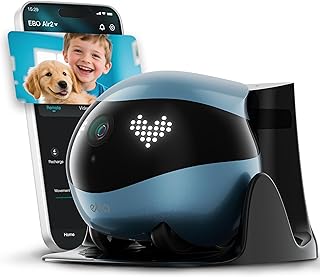
Enabot EBO Air 2 FamilyBot
- 2K camera, 2304 x 1296, with a 137-degree diagonal field of view
- LED laser switched on from the app control screen
- App driving with first-person camera view
- Scheduled 3-minute patrols and motion alerts
- Automatic recharging with path retracing and infrared guidance
- SmartCharge schedule for docking times
- Customizable dot-matrix eye expressions
- 2,450mAh battery, 95 x 95 x 89 mm, 282 g
- 32GB microSD card included, storage up to 256GB
- Dual-band 2.4GHz and 5GHz Wi-Fi
The EBO Air 2 has the most literal shutoff timer in this group: its scheduled patrols last 3 minutes each. The robot sets off from its dock, roams and records for three minutes, and returns, so every automatic session has a fixed length. The owner can also drive it live from the phone and switch the LED laser on from the same control screen, ending the game by driving home whenever the cat has had enough. That pair, a 3-minute automatic patrol plus a manual drive-home, gives the owner two different kinds of ending.
The robot returns to its dock on its own, retracing its path or following infrared guidance, and the SmartCharge schedule keeps it topped up for the next patrol. The 2K camera with a 137-degree view keeps the picture clear, and night vision handles dark rooms. The dot-matrix eyes add a playful touch. The app takes time to learn, and the preset actions need a few taps to reach, but the driving and the laser control are straightforward once learned. Thick rugs and high thresholds can slow it down, so the patrol route should stick to clear floors.
Pros: 3-minute scheduled patrols; LED laser on a driving robot; 2K wide-angle camera; auto-recharge with schedule.
Cons: App takes time to learn; preset actions are fiddly to reach; small obstacle clearance limits thick rugs.
ZUMIMALL Pet Camera with Laser Toy
- 3MP video with dual-band 5GHz and 2.4GHz Wi-Fi
- Custom laser paths set through the phone app
- Scheduled auto-play
- 360-degree coverage with 355-degree pan and 120-degree tilt
- Auto tracking that follows the pet
- Two-way talk and pet detection alerts
- Night vision up to 33 feet
- MicroSD storage up to 128GB, Alexa and Google Assistant support
The ZUMIMALL is the fixed-camera answer to a timed schedule. The owner draws a custom path for the laser in the app, and scheduled auto-play runs that pattern at set times and then stops, so the session has a clear beginning and end. The 360-degree coverage and auto tracking keep the cat in frame while the dot moves, which matters when the owner is watching the session from work and wants to see the whole game, not just the start of it.
The 3MP camera is sharper than standard 1080p, and the dual-band Wi-Fi helps the live view stay smooth when the owner steers the laser by hand. Night vision reaches 33 feet, so an evening game stays visible after dark. Two-way talk lets the owner speak during a session, and pet detection alerts mark the moments the cat actually plays. The camera records to a microSD card up to 128GB, with cloud storage as an optional extra. Owners who want a set-and-forget routine with a pattern they designed themselves will get the most from this model.
Pros: Scheduled auto-play with custom paths; 3MP video; dual-band Wi-Fi; auto tracking.
Cons: Laser can be unresponsive at times; cloud storage needs a subscription; SD card not included.
Petcube Play 2 Wi-Fi Pet Camera
- 1080p HD video with a 160-degree ultra wide-angle view
- Built-in 3R class laser, 5mW, controlled by fingertip on the app screen
- Autoplay mode and scheduled play
- Two-way audio and night vision up to 30 feet
- 8x digital zoom
- Alexa built-in
- 2.4GHz Wi-Fi, iOS 14 and higher or Android 7.1.2 and higher
- 1-year limited warranty
- Dimensions 90.1 x 81.45 x 90.1 mm
The Petcube Play 2 gives the owner the most direct control over when a session ends. The laser lands wherever a finger touches the app screen, so the owner can stop the dot instantly, and the autoplay mode and scheduled play handle the sessions nobody is steering. A scheduled game starts at the set time, runs its course, and stops, while a live game ends the moment the owner lifts a finger. That combination suits owners who want both a reliable timer and a manual override.
The 160-degree wide-angle view covers most of a room from one shelf, which is what a timed session needs: the dot stays visible wherever the cat goes within that room. The 8x digital zoom helps when the cat retreats to a far corner, and night vision reaches 30 feet for evening sessions. Two-way audio lets the owner talk while playing. The unit is compact, setup runs through the Petcube app on 2.4GHz Wi-Fi, and the maker lists a 1-year limited warranty. Video history and smart alerts sit behind the optional Petcube Care plan, but live viewing, laser control, and scheduling work without it.
Pros: Instant manual stop plus scheduled play; autoplay mode; wide-angle 1080p view; two-way audio.
Cons: Fixed position with no pan or tilt; 2.4GHz Wi-Fi only; some features sit behind an optional subscription.
Youpet Dog Camera
- 1080p video with night vision
- Two-way audio
- Red-dot laser controlled through the GULIGULI app
- Treat dispenser
- App-controlled 360-degree movement
- 15-day standby
- 2.4GHz Wi-Fi
- No monthly fee
The Youpet Dog Camera fits a timed-play keyword because it stays ready and the owner controls when the game ends. The 15-day standby means the robot holds its charge between sessions, so a scheduled game does not find a flat device at the end of the week. When play time arrives, the owner opens the app, drives the robot in 360 degrees to find the cat, and starts the red-dot laser through the GULIGULI app. The owner steers the game live and ends it from the phone when the cat has had enough, so every session has a clear finish even though no fixed session length is listed.
The treat dispenser gives the timed session a finish that a laser alone cannot. A short chase that ends with a small snack lets the cat catch something real, and that payoff keeps the routine rewarding over weeks of daily play. The 1080p camera with night vision keeps the cat visible through the day and after dark, and two-way audio lets the owner talk during the game. The listing states no monthly fee, so the core features work without a paid plan. It runs on 2.4GHz Wi-Fi, so owners should check the router settings before ordering. For owners who want a timed routine on a robot that is always ready, the Youpet is the pick.
Pros: Red-dot laser with 360-degree movement; treat dispenser; 15-day standby; no monthly fee.
Cons: 2.4GHz Wi-Fi only; no session length is listed, so the owner ends each game from the app; laser control runs through the GULIGULI app, so the app name differs from the brand on the box.
Enabot EBO ROLA PetPal
- 2.5K camera, 2880 x 1620, 5MP sensor, 135-degree angle
- Laser games through the interactive toy module, sold separately
- App driving with 9 preset actions and 7 preset sounds
- Snack feeding for pieces under 12 mm, with scheduled feeding
- 3,500mAh battery, 2 to 8 hours of use
- Automatic return to the charging dock within close range
- Night vision, two-way audio, pet-initiated call button
- 32GB microSD card included, storage 16GB to 256GB
- Dual-band 2.4GHz and 5GHz Wi-Fi
- Dimensions 192 x 171.3 x 120 mm, weight 254 g
The ROLA PetPal is the only product here that schedules the end of a game as well as the start. The maker page lists scheduled snack feeding alongside laser games, so a timed routine can run like this: the robot drives over at a set time, the laser starts a chase, and a snack follows as the reward. That finish matters, because a laser dot can never be caught, and a cat that never catches anything can lose interest in the game over time. A short chase with a real payoff keeps the routine rewarding.
The 2.5K camera is the sharpest among the robots here, and the app offers preset actions, sounds, two-way audio, and a call button the pet can press with a paw. AI pet recognition can snap a photo when it recognises the cat. The honest catch is that the laser games need the interactive toy module, which is sold separately, so buyers should check the box contents before ordering. The base package includes the storage module and the dock, and the robot returns to the dock on its own when it stays within close range.
Pros: Scheduled snack feeding plus laser games; sharp 2.5K camera; preset actions and sounds; timed routines.
Cons: Laser games need the separately sold interactive module; auto-return works only within close range of the dock; no fall prevention, so stairs need blocking.
pumpkii BQ70 Pet Camera Robot
- 1080p camera with infrared night vision
- Interactive laser play started from the PumPlus app
- App driving from room to room
- Treat dispenser with remote tossing
- Automatic return to the charging dock
- Two-way audio
- 2.4GHz Wi-Fi only
- Crosses rugs up to 15 mm thick
- 8.66 x 7.28 x 5.91 inches, 3.6 pounds
The pumpkii BQ70 is the most affordable driving robot in this group, and it covers the timer basics: drive to the cat, start the laser from the app, and let the chase run, with the robot returning to its dock on its own when the battery runs low. The 1080p camera with infrared night vision handles day and evening, and the treat dispenser adds a snack reward at the end of a game. For owners who want a mobile routine with a clear end, without the outlay of the Enabot robots, the BQ70 is the entry point.
The trade-offs are in the app and the connection. The app cannot turn and move forward at the same time, which makes steering less smooth, and the video signal can cut out. It runs on 2.4GHz Wi-Fi only, and it handles rugs up to 15 mm thick. The snack capacity is small, so the dispenser needs refilling often. Owners who can live with a simpler app get the essentials at the lowest outlay among the robots: drive, watch, talk, laser, snack, dock.
Pros: Mobile laser play at a low outlay; auto recharge; snack tossing; infrared night vision.
Cons: App steering is less smooth; video signal can cut out; 2.4GHz Wi-Fi only; small snack capacity.
Buying guide
Start with the timer, not the toy. Decide how long a session should last before buying anything, and then check that the product can actually enforce it. The EBO Air 2 has the clearest automatic limit in this group, with scheduled patrols of 3 minutes. The Petcube Play 2 and the ZUMIMALL run scheduled sessions that start and stop at set times. The EBO Air runs its automatic laser toy on a routine the owner sets, and returns to its dock when done. The Youpet Dog Camera moves in 360 degrees under app control, so the owner can drive the laser to the cat and end the session by parking the robot. A product that cannot say how a session ends is a poor fit for this keyword.
Think about how the laser is steered, because a schedule still needs a good game. Finger-drag control, as on the Petcube Play 2, gives the most direct authorship over the pattern, and the dot stops the moment the finger lifts. Custom paths, as on the ZUMIMALL, suit owners who want to draw a route once and let the camera repeat it. App-controlled movement, as on the Youpet Dog Camera, suits owners who want to drive the laser to the cat from the phone. Robot lasers move with the robot, so the pattern is the path the owner drives, and parking the robot ends the game.
Check the Wi-Fi band before buying. The Petcube Play 2, the Youpet Dog Camera, and the pumpkii BQ70 run on 2.4GHz Wi-Fi only. The ZUMIMALL, the EBO Air 2, and the ROLA PetPal support both 2.4GHz and 5GHz. A home with a single 5GHz network will leave the 2.4GHz-only models unable to connect, so check the router settings first. Dual-band models are also more forgiving when the signal is weak in a far room.
Look at charging and battery in the same way. Fixed cameras plug in and never run flat, which suits a strict shutoff routine. Robots need a dock and a clear path back to it. The EBO Air 2 retraces its path to the dock, the EBO Air and the ROLA PetPal return within close range, and the pumpkii BQ70 needs a clear line of sight to the dock. Place the dock in an open spot with a clear approach, and avoid putting it behind furniture or in a narrow gap.
Consider the extras that change the value of a session. Two-way audio helps owners who like to talk during play, and all seven products here include it. Night vision matters for evening games, and all seven include it. A snack dispenser changes the end of a game from nothing to something, and the ROLA PetPal and the pumpkii BQ70 include one. A wand or feather attachment gives the cat a physical target, and the EBO Air and the EBO Air 2 include feather options. Storage matters too: the Enabot robots include a 32GB card, while the ZUMIMALL needs a card bought separately.
Finally, check what needs a subscription and what needs an extra purchase. The Petcube Play 2 works without a subscription, but video history and smart alerts sit behind the optional Petcube Care plan. The ZUMIMALL needs a subscription for cloud storage, with local recording to a card as the alternative. The ROLA PetPal laser games need the separately sold interactive toy module, so buyers should confirm the box contents. The EBO Air needs no subscription for core use. Reading the listing carefully before ordering avoids the most common disappointment in this category: expecting a feature that lives in an accessory or a plan.
FAQ
How do I set up a daily play schedule?
Open the product app and look for the schedule, autoplay, patrol, or sleep setting, depending on the model. The ZUMIMALL and the Petcube Play 2 let the owner set play times directly. The EBO Air 2 uses scheduled patrols, the ROLA PetPal uses scheduled feeding, and the EBO Air uses sleep mode between sessions. Start with one short session at the cat's most active hour, watch how the cat responds for a few days, and then add a second session if the cat clearly enjoys it.
How long should each timed session last?
Short sessions work best. A few minutes of active chasing, followed by a physical toy or a snack, gives the cat a satisfying finish. Long sessions can leave a cat frustrated, because the dot can never be caught. The automatic modes on these products run for a limited time and then rest, which is a sensible rhythm. Owners should watch the cat's response and end the game while the cat is still keen rather than waiting for the cat to give up.
Can I still steer the laser during a scheduled session?
Yes, on the models here. A scheduled session starts the game, and the owner can take over steering from the phone at any time. The Petcube Play 2 follows a fingertip, the ZUMIMALL follows a custom path or live steering, and the driving robots respond to the app controls while the session runs. If the owner is busy, the automatic mode keeps the game going without input.
Will the schedule still run if the Wi-Fi drops?
No, not reliably. The schedule lives in the app and the device, so a dropped connection can interrupt a session or stop a robot from returning to its dock. Fixed cameras recover on their own when the connection returns, because they plug in and keep running. Robots should be left in a room with a strong signal and a clear path to the dock, so a brief dropout does not leave the robot stranded mid-room.
Is the laser safe for a cat's eyes?
The makers describe their lasers as low-power Class 1, Class 2, or 3R devices of the kind used in pointers and computer mice, and they advise against pointing the beam directly into a pet's eyes. The practical rule is simple: aim the dot at the floor and walls, never at the cat's face, and stop the game if the cat shows signs of stress. The products here are designed to project the dot onto surfaces, and the owner controls where it goes.
Which is better for a schedule, a fixed camera or a driving robot?
A fixed camera suits one room and a strict timetable, with no battery to manage and no dock to place. A driving robot suits a cat that roams, and owners who want to check different rooms during the day. The robot costs more, needs charging, and can get stuck on thick rugs or thresholds, while the fixed camera can only play where it points. Owners who are unsure should start with a fixed camera and add a robot later if the cat clearly enjoys the game.
Conclusion
A schedule with a shutoff timer turns laser play from a random event into a routine the cat can rely on. The Enabot EBO Air leads this group with simple timed robot play and a self-righting body, and the EBO Air 2 runs 3-minute patrols with a laser. The ZUMIMALL pairs scheduled auto-play with custom paths, the Petcube Play 2 pairs scheduled play with the most direct live steering, and the Youpet Dog Camera is the affordable movable option with a red-dot laser and a treat dispenser. The ROLA PetPal ends timed sessions with a snack, and the pumpkii BQ70 offers mobile play at a low outlay. Any of the seven will give an indoor cat a better day, and the right one is the one whose schedule, timer, and coverage match the home it will live in.
Related guides
More ways to save on pet supplies
Programs that pair well with the guide above. Offers and eligibility are set by Amazon and may change.
Set up recurring deliveries of everyday items on eligible products. Terms and savings are set by Amazon.
Explore Subscribe & SaveFast, free shipping on eligible items, plus Prime Video and more. Eligible new members can start with a free trial.
Start a Prime free trialAudiobooks and podcasts for the commute, the garage or the kitchen. Eligible new members can start with a free trial.
Try Audible freeRead from a huge library of eBooks, including how-to guides and cookbooks. Eligible new members can start with a free trial.
Try Kindle UnlimitedAs an Amazon Associate we earn from qualifying purchases. Using these links costs you nothing extra.

Write Your Review
No reviews yet. Be the first to share your experience!