
Key takeaways
- Compare app-controlled automatic laser cat toys with scheduling, remote settings, cameras, and automatic play modes for indoor cats left home alone every day.
What's inside
As an Amazon Associate I earn from qualifying purchases. This post may contain affiliate links at no extra cost to you.
Remote toy settings change what a laser cat toy can do, because the owner no longer has to be in the room to run a game. The best app-controlled automatic laser cat toys for cat owners wanting remote toy settings let the owner change the laser pattern, the play time, the camera view, and the auto mode from a phone, from work, from a car, or from another room. The settings are the real product here: a toy with a good remote panel gives a cat a different game every day, while a toy with a single on and off button gives the same game every time.
Every product below was checked on a maker page or an Amazon product page, and every one offers a laser that the owner can control from a phone app, with remote settings for the pattern, the schedule, or the auto mode. The list mixes fixed cameras with a laser, rolling robots with a laser, and cameras with a snack dispenser, because remote settings can cover a camera, a laser, a robot, and a feeder at once. What unites them is control from afar: the owner opens the app, changes a setting, and the toy responds without a hand on the device.
Quick verdict
For most owners, the Petcube Play 2 is the strongest pick for remote settings. Its app lets the owner move the laser by sliding a finger on the screen, change the camera zoom, set play times, and turn on autoplay, all from one panel. Owners who want a rolling robot should look at the PUMPKII BQ75, which adds a snack dispenser and a movable body to the remote panel. Owners who want the widest camera view should look at the ZUMIMALL BF-BK07, which pans 355 degrees and tilts 120 degrees from the app. Owners who want a simple remote panel at a low cost should look at the VSTARCAM C38S-P.
| Product | Key spec | Best for |
|---|---|---|
| Petcube Play 2 | 1080p, 160 degree view, app laser control | Remote laser plus live view |
| ZUMIMALL Pet Camera BF-BK07 | 3MP 2K, pan 355 degrees, tilt 120 degrees | Remote camera control |
| VSTARCAM Pet Camera C38S-P | 3MP, pan 355 degrees, tilt 120 degrees | Budget remote settings |
| PUMPKII Pet Camera Robot BQ75 | Rolling robot, laser plus snack dispenser | Remote driving plus rewards |
| Pawbo Life Pet Camera PPC-21CL | 720p, 130 degree view, app laser plus dispenser | Simple remote panel |
| Youpet Dog Camera | 1080p, rolling robot, app laser plus dispenser | Long standby remote play |
| Enabot EBO Air | 1080p, AI pet tracking, infrared laser | A robot that follows the cat |
How we chose
We chose toys that offer remote settings in the app, not just a remote on and off switch. That means the owner can change the laser pattern, the play time, the camera view, or the auto mode from the phone, and the toy responds. Every product page we opened confirmed the laser, the app control, and at least one remote setting, and we left out toys with a laser but no app, and toys with an app but no laser. We also left out the Petcube Bites 2 Lite, which dispenses snacks but has no laser, and the Enabot EBO SE, which has no laser at all.
Remote control depth came first. A toy that lets the owner draw a laser path, change the speed, or set a schedule gives more control than a toy with a single auto button. Camera control came second, because the owner who changes settings remotely also wants to see the result, and a pan and tilt head or a zoom lens covers more of the room. Auto mode came third, since a toy that can run on its own after the owner sets it up suits owners who are away all day. We also weighed night vision, two way audio, and the size of the room each toy covers, since remote play happens in the evening and in rooms of different sizes.
Petcube Play 2
- Camera: 1080p HD, 160 degree wide angle view, 8x digital zoom
- Laser: Class 3R laser, 5mW, moved by sliding a finger on the app screen
- Remote settings: play times, autoplay on motion, laser pattern, camera zoom
- Night vision: up to 30 ft
- Audio: 2 way audio, built in speaker and microphone
- WiFi: 2.4GHz, works with iOS 14 and up and Android 7.1.2 and up
- Extras: Alexa support, 1 year warranty, 90.1 by 81.45 by 90.1 mm
The Petcube Play 2 has the deepest remote panel in this guide, and that is why it leads. The app shows a live 1080p view with a 160 degree wide angle, and the owner moves the laser by sliding a finger on the screen, which turns a phone into a remote control for the red dot. Play times can be set in the app, autoplay starts a session when motion is detected, and the 8x digital zoom lets the owner follow a cat across the room without moving the camera. Two way audio lets the owner talk to the cat during a session, and Alexa support adds voice control. The remote settings cover the laser, the camera, and the schedule from one panel, so the owner does not need a second app or a separate remote. The camera sits still, so it cannot chase the cat around a corner, and it needs a 2.4GHz WiFi network, but for remote control from anywhere, it is the most polished pick here.
Pros: Deepest remote panel, app laser control with live view, autoplay plus scheduling, two way audio.
Cons: Fixed camera cannot follow the cat, 2.4GHz WiFi only, no snack dispenser.
ZUMIMALL Pet Camera BF-BK07
- Camera: 3MP, 1440p 2K resolution
- Laser: app controlled with custom paths, scheduled laser play sessions
- Pan and tilt: 355 degree pan, 120 degree tilt, controlled from the app
- Night vision: up to 33 ft
- Audio: 2 way audio, one touch call button
- WiFi: dual band 2.4 and 5GHz
- Extras: auto tracking, motion and pet detection, SD card up to 128GB, Alexa and Google support, privacy mode, 2.95 by 2.76 by 4.72 in
The ZUMIMALL BF-BK07 is the pick for owners who want to control the camera as well as the laser from the app. The 3MP camera records in 1440p, and the head pans 355 degrees and tilts 120 degrees from the app, so the owner can follow a cat from one side of the room to the other without moving the camera. The laser runs from the app with custom paths the owner draws, and laser play sessions can be scheduled, which gives the cat a game at set times even when the owner is away. Auto tracking follows a moving pet on its own, and motion and pet detection send alerts when the cat is active. Night vision reaches 33 feet, two way audio includes a one touch call button, and the camera works on dual band WiFi, which is rare in this list. The camera records to an SD card up to 128GB, and a privacy mode covers the lens when the owner is home. The toy is a fixed camera rather than a robot, so it cannot roll after the cat, but its wide pan and tilt cover more of a room than any other fixed camera here.
Pros: Remote pan and tilt, custom laser paths, scheduled sessions, dual band WiFi.
Cons: Fixed camera cannot roll, no snack dispenser, app setup takes time.
VSTARCAM Pet Camera C38S-P
- Camera: 3MP resolution
- Laser: remotely controlled through the app, fixed point cruise mode
- Pan and tilt: 355 degree pan, 120 degree tilt, controlled from the app
- View: 107 degree diagonal view
- Night vision: up to 10 m
- Audio: two way audio
- WiFi: 2.4GHz
- Extras: motion detection alerts, TF card up to 128GB, multi user sharing
The VSTARCAM C38S-P is the budget pick for remote settings, and it covers the basics well. The 3MP camera pans 355 degrees and tilts 120 degrees from the app, matching the ZUMIMALL on movement, and the laser runs from the app with a fixed point cruise mode that moves the dot on its own. Motion detection sends alerts when the cat is active, and the camera records to a TF card up to 128GB. Two way audio lets the owner talk to the cat during a session, and multi user sharing lets a second person in the household open the camera and run the laser. Night vision reaches ten meters, which covers a typical living room in the evening. The camera has no snack dispenser and no auto tracking, and it works on 2.4GHz WiFi only, but for an owner who wants remote laser control and a remote camera at the lowest cost in this guide, it does the job. The wide pan and tilt mean one camera can watch a whole room, which matters when the cat moves between a window perch and a scratching post.
Pros: Lowest cost remote pick, wide pan and tilt, fixed point cruise mode, multi user sharing.
Cons: No auto tracking, no snack dispenser, 2.4GHz WiFi only.
PUMPKII Pet Camera Robot BQ75
- Camera: HD video
- Laser: app controlled laser toy
- Snack dispenser: treat dispensing from the app
- Movement: movable robot, app controlled plus auto mode
- Detection: motion detection
- Audio: two way audio
- WiFi: WiFi connected
- Extras: AI push alerts with subscription, battery powered, 1.97 kg
The PUMPKII BQ75 is the pick for owners who want a robot that rolls, a laser, and a snack dispenser in one remote panel. The app controls the robot movement, the laser, and the snack dispenser, so a remote session can drive the robot across the floor, shine the laser ahead of it, and drop a small snack at the end, which gives a cat a full play routine rather than a single red dot on one patch of carpet. Motion detection alerts the owner when the cat is active, and an auto mode runs the robot on its own when the owner is away. The robot is battery powered and weighs 1.97 kilograms, so it is easy to see and hard for a cat to knock over. Two way audio lets the owner talk to the cat while the robot moves. The listing showed no featured offers at the time of the check, so owners should confirm availability before ordering, and the AI push alerts need a subscription, though the core laser, driving, and dispensing functions work without one. For a remote play routine that mixes movement, laser, and snacks, this is the most complete robot in the guide.
Pros: Laser plus snack dispenser, app controlled movement, auto mode, motion detection.
Cons: Listing showed no featured offers when checked, AI push needs a subscription, heavier than a camera.
Pawbo Life Pet Camera PPC-21CL
- Camera: 720p, 130 degree wide angle view, 4x digital zoom
- Laser: laser game, manual or automatic through the Pawbo Life app
- Snack dispenser: treat dispensing from the app
- Audio: two way audio
- WiFi: 2.4GHz
- Extras: up to 8 users can share the camera, 4.4 by 4.4 by 7.9 in, 1.2 lb
The Pawbo Life PPC-21CL is the simplest remote panel in this guide, and its simplicity is the point. The 720p camera sees a 130 degree wide angle with 4x digital zoom, and the laser game runs manual or automatic through the Pawbo Life app, so the owner can drive the dot or let the toy run it on its own. The snack dispenser drops a small food reward from the app, which helps a shy cat engage with the camera. Two way audio lets the owner talk to the cat, and up to eight users can share the camera, which suits a household where more than one person wants to play with the cat. The camera measures 4.4 by 4.4 by 7.9 inches and weighs 1.2 pounds, so it sits on a shelf without taking over the room. Owners should note that the Pawbo brand is no longer active, so the listing may not be restocked and the app may not receive updates, which makes this a pick for owners who find it in stock and accept the risk. The 720p camera is also the lowest resolution in this guide, though it is enough to see a cat across a room.
Pros: Simple remote panel, laser plus snack dispenser, up to 8 users, two way audio.
Cons: Brand no longer active, availability uncertain, 720p is the lowest resolution here.
Youpet Dog Camera
- Camera: 1080p resolution
- Laser: red dot laser, app controlled
- Snack dispenser: treat dispensing from the app
- Movement: app controlled 360 degree movement
- Night vision: infrared night vision
- Audio: two way audio
- WiFi: 2.4GHz
- Extras: 15 day standby, no monthly fee
The Youpet Dog Camera is a movable robot that pairs a red dot laser with a snack dispenser, and its long standby time sets it apart. The 1080p camera and the laser both run from the app, and the robot drives in 360 degrees, so the owner can steer it around the room and shine the laser where the cat is. The snack dispenser drops a small food reward during or after play, which helps a shy cat engage with the robot. Night vision covers evening sessions, two way audio lets the owner talk to the cat, and the robot stands by for up to 15 days between charges, which is the longest standby in this guide. There is no monthly fee for the core functions. Owners should note that this camera uses the same hardware and the same app as the GULIGULI Smart Pet Camera under a different brand name, so the two listings are not separate designs. For a remote play routine that mixes a laser, a snack, and a robot that can wait days between charges, this is a solid pick.
Pros: Laser plus snack dispenser, 15 day standby, 360 degree movement, no monthly fee.
Cons: Shares hardware with a second brand listing, 2.4GHz WiFi only, no auto tracking.
Enabot EBO Air
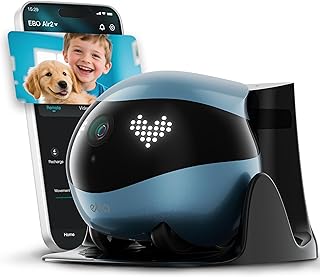
- Camera: 1080p, 118 degree field of view
- Laser: infrared laser, app controlled
- Tracking: AI pet tracking follows the cat on its own
- Night vision: infrared night vision
- Audio: two way talk
- Battery: 2500mAh, auto recharge, max speed 1 m per second
- WiFi: 2.4 and 5GHz
- Extras: scheduled patrol, 32GB microSD included up to 256GB, 9.6 by 9.6 by 8.9 cm, 310 g
The Enabot EBO Air is the smartest robot in this guide, because its AI pet tracking follows the cat on its own. The 1080p camera sees a 118 degree field of view, and the infrared laser runs from the app, so the owner can drive the robot and the laser together during a scheduled patrol. When the battery runs low, the robot returns to its charger on its own, and the 2500mAh cell keeps it moving through a play session at up to one meter per second. Scheduled patrols mean the robot can tour the home at set times, checking on the cat and starting a laser game when it finds one, which is the closest thing in this guide to a fully automatic remote toy. Two way talk lets the owner speak to the cat, and a 32GB microSD card is included, with support up to 256GB. The robot weighs 310 grams and measures about 9.6 by 9.6 by 8.9 centimeters, so it is small enough to pass under low furniture. The Amazon listing showed the robot as currently unavailable, and the maker store lists it for sale, so owners should confirm where to buy it before ordering. It has no snack dispenser, but for a robot that finds the cat and starts play on its own, it is the strongest pick here.
Pros: AI pet tracking, scheduled patrol, auto recharge, dual band WiFi, compact size.
Cons: Amazon listing showed currently unavailable when checked, no snack dispenser, small robot can hide under furniture.
Buying guide
Start with the remote panel, not the camera. Open the app listing before buying and check what the owner can change from the phone: the laser pattern, the play time, the camera view, the auto mode, and the snack dispenser. A toy that lets the owner draw a laser path, change the speed, or set a schedule gives more control than a toy with a single auto button. Check whether the app works on the owner phone, since the Petcube app needs iOS 14 and up or Android 7.1.2 and up, and other apps have their own minimum versions. Check whether the core functions need a subscription: none of the toys here need one for basic laser play and live viewing, though some offer a paid plan for cloud storage or AI alerts.
Camera control decides how much of the play the owner actually sees. A 1080p camera is enough for a living room, and a 2K camera like the ZUMIMALL shows more detail. Pan and tilt matter more than raw resolution: a camera that pans 355 degrees and tilts 120 degrees can follow a cat across a whole room, while a fixed camera only sees the patch in front of it. A digital zoom, like the 8x zoom on the Petcube Play 2 or the 4x zoom on the Pawbo and SKYMEE cameras, helps follow a cat across the room. Night vision matters for evening sessions, and the cameras here reach ten meters to 33 feet, which covers a typical room. Two way audio lets the owner talk to the cat, which can calm a nervous cat or call a hiding cat out to play.
Auto mode is the feature that matters most when the owner is away all day. A toy with autoplay on motion, like the Petcube Play 2, starts a session when the cat is active. A toy with a scheduled patrol, like the Enabot EBO Air, tours the home at set times. A toy with an auto cruise mode, like the SKYMEE Owl Robot, drives on its own. Set the auto mode to run two or three short sessions a day, around ten to fifteen minutes each, and end each session with a small snack or a physical toy the cat can catch, since a laser dot can never be caught and some cats grow frustrated if the game never ends with a reward. Check the WiFi band too: most toys here need 2.4GHz, while the ZUMIMALL and the Enabot EBO Air also work on 5GHz, which helps in a home with a busy network.
Robot toys bring the laser to the cat, but they move slower than a fixed laser and they need a clear floor. Pick up cables, small rugs, and clutter before a scheduled session, and check the rug height the robot can handle. A robot with auto recharge, like the Enabot, returns to its charger on its own, while a robot with a long standby, like the Youpet, waits days between charges. Check the size and weight of the robot, since a small robot can hide under furniture and a heavy robot can knock over a light bowl. Keep the toy clean, keep the lens clear, and check the app for firmware updates, since the app controls the schedule and the laser.
Laser safety is worth a few minutes of attention. The Petcube Play 2 lists a Class 3R laser at 5mW, and the other toys use a similar red dot laser. Never point the laser at a cat eyes or a person eyes, and do not use a laser toy as the only play a cat gets. Mix laser sessions with a physical toy the cat can catch, and watch the cat during the first few sessions: a cat that pants, hides, or loses interest may need a shorter session or a different toy.
FAQ
What remote settings should a laser cat toy have?
At minimum, the app should let the owner start and stop the laser, set the play time, and watch the camera. Better toys add a laser pattern the owner can draw, a schedule, an auto mode, a camera pan and tilt control, and a snack dispenser. The Petcube Play 2 covers the laser, the camera, and the schedule from one panel, the ZUMIMALL adds remote pan and tilt with custom laser paths, and the PUMPKII BQ75 adds remote driving plus a snack dispenser.
Can I change the laser pattern from my phone?
Yes, on the toys with the deepest remote panels. The Petcube Play 2 lets the owner move the laser by sliding a finger on the screen, the ZUMIMALL lets the owner draw custom paths, and the VSTARCAM offers a fixed point cruise mode that moves the dot on its own. The rolling robots let the owner drive the robot and the laser together. Check the app before buying if a custom pattern matters, since some toys offer only a manual or automatic mode.
How do I set up automatic play when I am away?
Open the toy app, set the times, the length, and the pattern for each session, and let the toy run the schedule on its own. The Petcube Play 2 offers autoplay on motion, the Enabot EBO Air offers a scheduled patrol, and the SKYMEE Owl Robot offers an auto cruise mode. Start with two short sessions a day, around ten to fifteen minutes each, and end each session with a small snack or a physical toy the cat can catch.
Do these toys work on 5GHz WiFi?
Most toys in this guide need 2.4GHz WiFi, which is the standard for smart home cameras. The ZUMIMALL BF-BK07 and the Enabot EBO Air also work on 5GHz, which helps in a home with a busy network. Check the product page for the WiFi band before buying, and keep the toy within range of the router, since a weak signal can delay the laser or freeze the camera.
Can more than one person control the toy?
Yes, on the toys that offer multi user sharing. The VSTARCAM C38S-P lets more than one person open the camera and run the laser, the ZUMIMALL BF-BK07 offers multi user sharing, and the Pawbo Life camera supports up to eight users. Each person needs the app and an account, and the owner can control who has access. Check the app before buying if sharing matters to the household.
What if my cat ignores the laser?
Try a different surface: a laser dot shows best on a hard floor or a low pile rug, and it is hard to see on a thick carpet or in bright sunlight. Run the session in the evening, move the dot slowly along the floor rather than fast across the room, and end the session with a small snack. A robot that rolls, like the PUMPKII BQ75 or the Youpet camera, can also help, since the movement and the sound of the robot catch a cat attention before the laser does.
Conclusion
Remote toy settings turn a laser cat toy from a simple red dot into a play system the owner can run from anywhere. The Petcube Play 2 is the pick for owners who want the deepest remote panel, the ZUMIMALL BF-BK07 is the pick for remote camera control, and the VSTARCAM C38S-P is the budget pick. The PUMPKII BQ75, Pawbo Life camera, and Youpet camera are the picks for owners who want a laser plus a snack dispenser, and the Enabot EBO Air is the pick for owners who want a robot that finds the cat and starts play on its own. Check the remote panel before buying, confirm the WiFi band and the app version, and set two or three short sessions a day with a snack or a physical toy at the end. Done that way, an app controlled laser toy gives an indoor cat a varied game every day, and the owner can change the game from anywhere with a phone.
Related guides
More from Amazon
Programs that pair well with the guide above. Offers and eligibility are set by Amazon and may change.
Set up recurring deliveries of everyday items on eligible products. Terms and savings are set by Amazon.
Explore Subscribe & SaveFree shipping on eligible items, Prime Video and more. Eligible new members can start with a free trial.
Start a Prime free trialAudiobooks and podcasts to listen to on the go. Eligible new members can start with a free trial.
Try Audible freeRead from a large library of eBooks and audiobooks on any device. Check Amazon for current plans.
Explore Kindle UnlimitedAs an Amazon Associate we earn from qualifying purchases.
More ways to save on pet supplies
Programs that pair well with the guide above. Offers and eligibility are set by Amazon and may change.
Set up recurring deliveries of everyday items on eligible products. Terms and savings are set by Amazon.
Explore Subscribe & SaveFast, free shipping on eligible items, plus Prime Video and more. Eligible new members can start with a free trial.
Start a Prime free trialAudiobooks and podcasts for the commute, the garage or the kitchen. Eligible new members can start with a free trial.
Try Audible freeRead from a huge library of eBooks, including how-to guides and cookbooks. Eligible new members can start with a free trial.
Try Kindle UnlimitedAs an Amazon Associate we earn from qualifying purchases. Using these links costs you nothing extra.

Write Your Review
No reviews yet. Be the first to share your experience!